
Android Room database is a part of jet pack components provided by android. Android room database is similar to that of Sqlite db previously used in android app development, with added advantages like query check during compilation and also easy to declare and use avoiding the boilerplate code.
We have seen other local databases before may have a look.
Table of Contents
Android room database
Room database is much better when compared with SQLITE DB, there are few benefits of using Room persistence library over Sqlite they are
- Initializing room DB is much simpler because the boilerplate code is almost excluded.
- Methods of Room DB are accessible with Kotlin Coroutine as well.
- Query’s are compiled just like the code.
- Management of the DB is simple.
Add Room to your project
def room_version = "2.2.4"

implementation "androidx.room:room-runtime:$room_version"
annotationProcessor "androidx.room:room-compiler:$room_version"
Add a permission in manifest file to allow app to save data into storage.
<uses-permission android:name="android.permission.WRITE_EXTERNAL_STORAGE"/>
Project Structure :
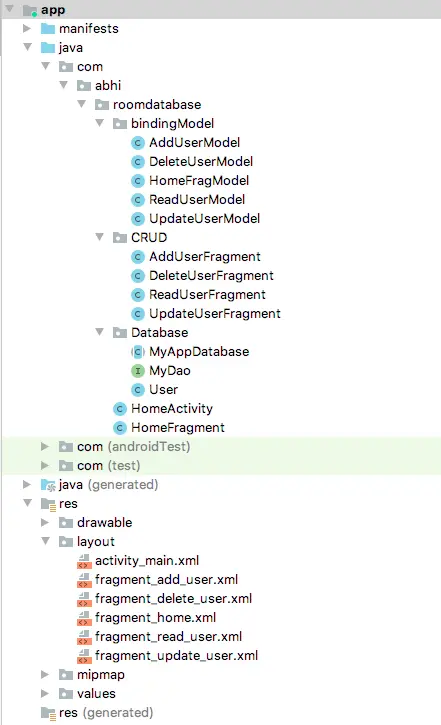
Now let’s start by creating table i.e., Entity in Room DB
- id
- name
User.java
We will create a Entity file using which a table structure is created. Provide a table name
@Entity(tableName = "users")
Column info and primary key
@PrimaryKey
private int id;

@ColumnInfo(name = "user_name")
private String name;

@ColumnInfo(name = "user_email")
private String email;
import androidx.room.ColumnInfo;
import androidx.room.Entity;
import androidx.room.PrimaryKey;

@Entity(tableName = "users")
public class User
{
    @PrimaryKey
    private int id;

    @ColumnInfo(name = "user_name")
    private String name;

    @ColumnInfo(name = "user_email")
    private String email;

    public int getId() {
        return id;
    }

    public void setId(int id) {
        this.id = id;
    }

    public String getName() {
        return name;
    }

    public void setName(String name) {
        this.name = name;
    }

    public String getEmail() {
        return email;
    }

    public void setEmail(String email) {
        this.email = email;
    }
}
MyDao :
Declare CRUD operations to be performed on DB in a interface MyDao
import androidx.room.Dao;
import androidx.room.Delete;
import androidx.room.Insert;
import androidx.room.OnConflictStrategy;
import androidx.room.Query;
import androidx.room.Update;

import java.util.List;

@Dao
public interface MyDao
{

    @Insert(onConflict = OnConflictStrategy.IGNORE)
    public void addUser(User user);

    @Query("select * from users")
    public List<User> getUsers();

    @Delete
    public void deletUser(User user);

    @Update
    public void updateUser(User user);

}
MyAppDatabase :
Initialize the database by providing entities i.e., if there are multiple tables multiple entities need to be declared as
(entities = {User.class,User1.class...},.....)
then version and export schema
@Database(entities = {User.class},version = 1,exportSchema = true)
import androidx.room.Database;
import androidx.room.RoomDatabase;

@Database(entities = {User.class},version = 1,exportSchema = true)
public abstract class MyAppDatabase extends RoomDatabase
{

    public abstract MyDao myDao();
}
activity_main.xml
I have create a fragment’s for making CRUD operations so declared a frame layout.
<?xml version="1.0" encoding="utf-8"?>
<LinearLayout xmlns:android="https://schemas.android.com/apk/res/android"
    xmlns:app="https://schemas.android.com/apk/res-auto"
    xmlns:tools="https://schemas.android.com/tools"
    android:layout_width="match_parent"
    android:layout_height="match_parent"
    tools:context=".HomeActivity"
    android:orientation="vertical">


    <FrameLayout
        android:id="@+id/fragment_container"
        android:layout_width="match_parent"
        android:layout_height="match_parent"/>


</LinearLayout>
HomeActivity :
In home activity initialize fragment manager and MyAppDatabase
public static FragmentManager fragmentManager;
public static MyAppDatabase myAppDatabase;
….
fragmentManager = getSupportFragmentManager();
myAppDatabase = Room.databaseBuilder(getApplicationContext(), MyAppDatabase.class,"userdb").allowMainThreadQueries().build();
then load home fragment
// Null checking of container
if(findViewById(R.id.fragment_container)!=null){

    if(savedInstanceState!=null){
        return;
    }

    fragmentManager.beginTransaction().add(R.id.fragment_container,new HomeFragment()).commit();
}
public class HomeActivity extends AppCompatActivity {

    public static FragmentManager fragmentManager;
    public static MyAppDatabase myAppDatabase;

    @Override
    public void onCreate(@Nullable Bundle savedInstanceState) {
        super.onCreate(savedInstanceState);
        setContentView(R.layout.activity_main);

        fragmentManager = getSupportFragmentManager();
        myAppDatabase = Room.databaseBuilder(getApplicationContext(), MyAppDatabase.class,"userdb").allowMainThreadQueries().build();


        // Null checking of container
        if(findViewById(R.id.fragment_container)!=null){

            if(savedInstanceState!=null){
                return;
            }

            fragmentManager.beginTransaction().add(R.id.fragment_container,new HomeFragment()).commit();
        }

    }
}
Insert Operation :
fragment_home.xml
Design the view to choose an operation to be performed on db
<?xml version="1.0" encoding="utf-8"?>
<layout xmlns:android="https://schemas.android.com/apk/res/android">

    <data>
        <variable
            name="HomeFragModel"
            type="com.abhi.roomdatabase.bindingModel.HomeFragModel" />
    </data>

    <LinearLayout
        android:layout_width="match_parent"
        android:layout_height="match_parent"
        android:gravity="center"
        android:orientation="vertical">

        <Button
            android:id="@+id/bn_add_user"
            android:layout_width="182dp"
            android:layout_height="wrap_content"
            android:text="Add User" />


        <Button
            android:id="@+id/bn_view_user"
            android:layout_width="182dp"
            android:layout_height="wrap_content"
            android:text="View User" />

        <Button
            android:id="@+id/bn_delete_user"
            android:layout_width="182dp"
            android:layout_height="wrap_content"
            android:text="Delete User" />

        <Button
            android:id="@+id/bn_update_user"
            android:layout_width="182dp"
            android:layout_height="wrap_content"
            android:text="Update User" />

    </LinearLayout>

</layout>

HomeFragment.java :
Initialize data binding of the layout and initialize views
FragmentHomeBinding homeBinding = DataBindingUtil.inflate(inflater, R.layout.fragment_home, container, false);

homeBinding.bnAddUser.setOnClickListener(this);
homeBinding.bnViewUser.setOnClickListener(this);
homeBinding.bnDeleteUser.setOnClickListener(this);
homeBinding.bnUpdateUser.setOnClickListener(this);
….
public class HomeFragment extends Fragment implements View.OnClickListener {

    @Nullable
    @Override
    public View onCreateView(@NonNull LayoutInflater inflater, @Nullable ViewGroup container, @Nullable Bundle savedInstanceState) {


        FragmentHomeBinding homeBinding = DataBindingUtil.inflate(inflater, R.layout.fragment_home, container, false);

        homeBinding.bnAddUser.setOnClickListener(this);
        homeBinding.bnViewUser.setOnClickListener(this);
        homeBinding.bnDeleteUser.setOnClickListener(this);
        homeBinding.bnUpdateUser.setOnClickListener(this);

        return homeBinding.getRoot();
    }

    @Override
    public void onClick(View v) {

        switch (v.getId()) {


            case R.id.bn_add_user:

                HomeActivity.fragmentManager.beginTransaction().replace(R.id.fragment_container, new AddUserFragment()).addToBackStack(null).commit();

                break;

            case R.id.bn_view_user:

                HomeActivity.fragmentManager.beginTransaction().replace(R.id.fragment_container,new ReadUserFragment()).addToBackStack(null).commit();

                break;

            case R.id.bn_delete_user:

                HomeActivity.fragmentManager.beginTransaction().replace(R.id.fragment_container,new DeleteUserFragment()).addToBackStack(null).commit();

                break;

            case R.id.bn_update_user:

                HomeActivity.fragmentManager.beginTransaction().replace(R.id.fragment_container,new UpdateUserFragment()).addToBackStack(null).commit();
                break;
        }

    }
}
fragment_add_user.xml
Design a view to accept user info to store in db.
<?xml version="1.0" encoding="utf-8"?>

<layout xmlns:android="https://schemas.android.com/apk/res/android">

    <data>

        <variable
            name="AddUserModel"
            type="com.abhi.roomdatabase.bindingModel.AddUserModel" />
    </data>


<LinearLayout
    android:orientation="vertical" android:layout_width="match_parent"
    android:layout_height="match_parent"
    android:gravity="center"
    android:padding="20dp">

    <EditText
        android:id="@+id/id"
        android:layout_width="match_parent"
        android:layout_height="wrap_content"
        android:inputType="number"
        android:hint="user id"/>

    <EditText
        android:id="@+id/name"
        android:layout_width="match_parent"
        android:layout_height="wrap_content"
        android:hint="user name"/>

    <EditText
        android:id="@+id/email"
        android:layout_width="match_parent"
        android:layout_height="wrap_content"
        android:hint="user email"/>

    <Button
        android:id="@+id/btnSubmit"
        android:layout_width="match_parent"
        android:layout_height="wrap_content"
        android:text="Save User"/>

</LinearLayout>

</layout>
Final view of the screen which show android room database add query.

AddUserFragment.java
Initialize data binding and fetch user input to save a record.
public class AddUserFragment extends Fragment {

    @Nullable
    @Override
    public View onCreateView(@NonNull LayoutInflater inflater, @Nullable ViewGroup container, @Nullable Bundle savedInstanceState) {


        final FragmentAddUserBinding fragmentAddUserBinding = DataBindingUtil.inflate(inflater, R.layout.fragment_add_user,container,false);

        fragmentAddUserBinding.btnSubmit.setOnClickListener(new View.OnClickListener() {
            @Override
            public void onClick(View v) {

                int id = Integer.parseInt(fragmentAddUserBinding.id.getText().toString());
                String name = fragmentAddUserBinding.name.getText().toString();
                String email = fragmentAddUserBinding.email.getText().toString();

                User user = new User();

                user.setId(id);
                user.setName(name);
                user.setEmail(email);

                HomeActivity.myAppDatabase.myDao().addUser(user);

                Toast.makeText(getContext(), "User added successfully", Toast.LENGTH_SHORT).show();

            }
        });

        return fragmentAddUserBinding.getRoot();
    }
}
Read, update and delete operations are explained in the part 2 of this blog.