Table of Contents
React Native SQLite tutorial :
In this blog i will clearly dive you through the concept where most apps face the challenge, data is the key aspect of every app and now that we have wide spread of internet it is getting multiplied every day.
So we need to handle the data in much more effective way, for example if your app want to push some data to remote server and there might be network unavailable or some network failure happened suddenly while push there should be proper way to handle.
What if you lost the data ? at the time of pushing it to server how you will get back info ?
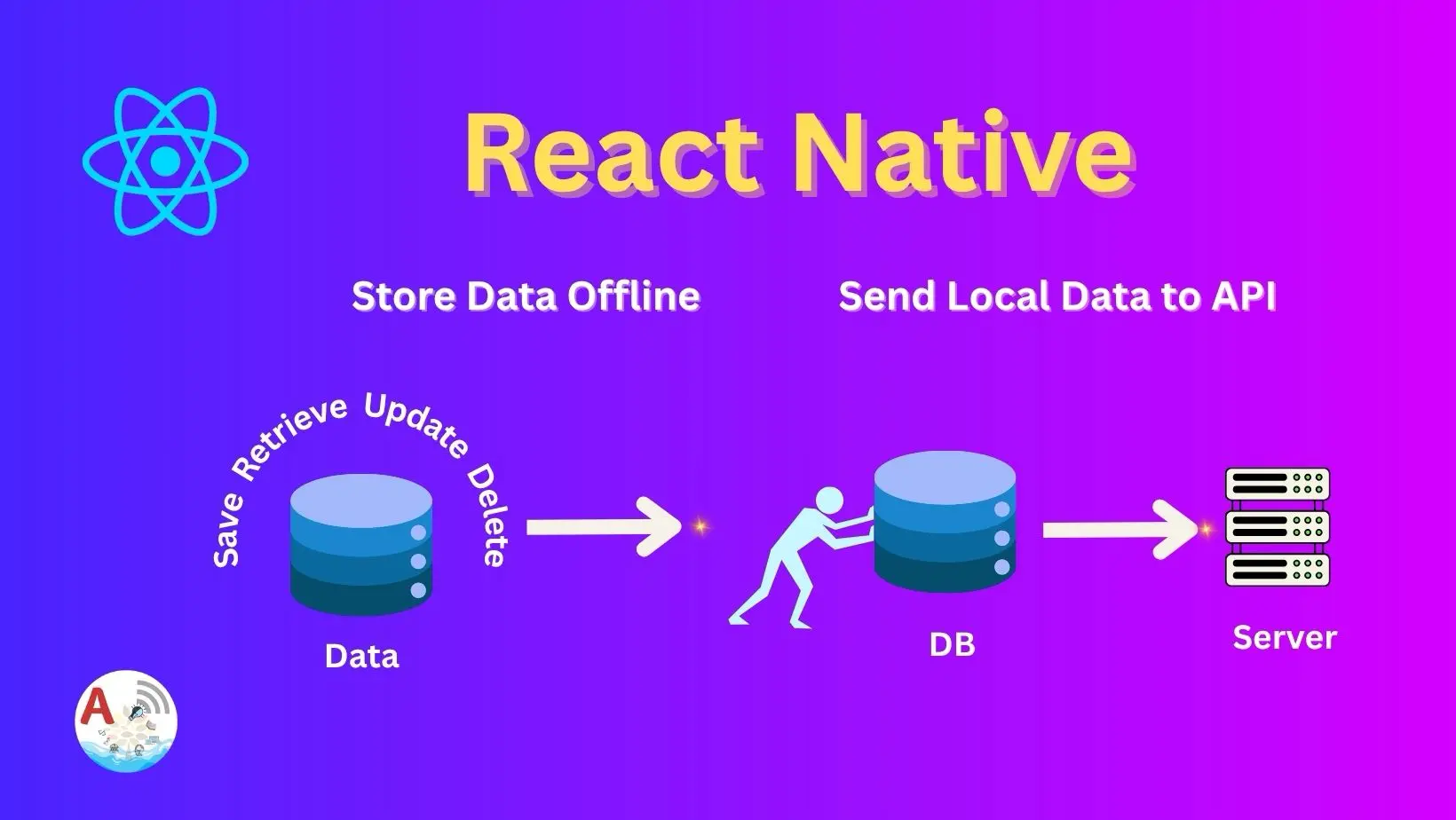
In this blog we will try to push local data to server React Native by sync SQLite with REST API yes we will be storing data in local db there by pushing it to remote server.
Here’s the basic plan to do so
- Save data to local DB
- Try pushing when device is connected to internet (mostly on WiFi)
- Try clearing db once data is successfully pushed.
Initialize DB :
We are initializing the database, creating a table
useEffect(() => {
        const initDb = async () => {
            const database = await SQLite.openDatabaseSync("tasks.db");
            setDb(database);

            await database.execAsync(`
                CREATE TABLE IF NOT EXISTS tasks (
                id INTEGER PRIMARY KEY AUTOINCREMENT,
                title TEXT,
                done INT
                );
            `);
            fetchTasks(database);
        };
        initDb();
    }, []);
CRUD Operations :
We try creating, updating, deleting and retrieving the data through these operations
Adding a task :
Inserting title into data
    const addTask = async () => {
        if(!db || title.trim().length === 0) return;
        await db.runAsync("INSERT INTO tasks (title, done) VALUES (?, ?)", [title, 0]);
        setTitle("");
        fetchTasks();
    };
Updating task :
Updating a task based on id
    const updateTask = async (id, title) => {
        if (!db) return;
        await db.runAsync("UPDATE tasks SET title = ? WHERE id = ?", [title, id]);
        fetchTasks();
        setModalVisible(false);
    };
Delete task :
Deleting a task based on id
    const deleteTask = async (id) => {
        if(!db) return;
        await db.runAsync("DELETE FROM tasks WHERE id = ?", [id]);
        fetchTasks();
    };
Retrieve / Fetch Data :
Finally fetching data
    const fetchTasks = async (database = db) => {
        if(!database) return;
        const rows = await database.getAllAsync("SELECT * FROM tasks");
        setTasks(rows);
    }
Render Item :
Here we are designing the each row of a list view, adding required buttons to process.
const renderItem = ({ item }) => (
        <View style ={styles.taskItem}>
            <TouchableOpacity
            onPress={() => toggleTask(item.id, item.done)}
            style={{ flex: 1 }}
            >
                <Text style={[styles.taskText, item.done ? styles.taskDone : null]}>
                    {item.title}
                </Text>
            </TouchableOpacity>

            <Button title="update" onPress={ () => openEditModal(item)} />
            <Button title="delete" onPress={ () => deleteTask(item.id)} />
            <Button title="sync" onPress={ () => pushDBToMockApi(tasks)} />

        </View>
    )
Designing the pop/update box :
Here we are designing a modal box through which we update the data.
<Modal visible= {modalVisible} transparent animationType="slide">
                <View style={styles.modalContainer}>
                    <View style={styles.modalContent}>
                        <Text style= {{fontSize: 18, fontWeight: "bold", marginBottom:10}}>
                            Edit Task
                        </Text>

                        <TextInput
                        style={styles.modalInput}
                        value={newTitle}
                        onChangeText={setNewTitle}
                        autoFocus={true}
                        />

                        <View style={{flexDirection: "row", justifyContent: "space-between", marginTop:15}}>
                            <Button
                            title="Update"
                            onPress={() => updateTask(currenttask.id, newTitle)}
                            />
                            <Button
                            title="Cancel"
                            onPress={() => setModalVisible(false)}
                            color="red"
                            />
                        </View>

                    </View>
                </View>
            </Modal>
User’s ListView :
Here we are designing the list view to populate user’s data
<View style= {styles.container}>
            <Text style= {styles.heading}>Offline Task Manager</Text>
            <View style= {styles.inputRow}>
                <TextInput
                style={styles.input}
                placeholder="Enter task"
                value={title}
                onChangeText={setTitle}
                />
                <Button title="Add" onPress={addTask}/>
            </View>

            <FlatList
            data={tasks}
            keyExtractor={(item) => item.id.toString()}
            renderItem={renderItem}
            ListEmptyComponent={<Text style= {styles.empty}>No tasks yet</Text>}
            />
Complete Code :
App.js
import React, { useEffect, useState }  from "react";
import {
    View, Text, TextInput, Button, FlatList, TouchableOpacity, StyleSheet, Modal
} from "react-native";
import * as SQLite from "expo-sqlite";
import { pushDBToMockApi } from "./sync";

export default function App(){
    const [db, setDb] = useState(null);
    const [tasks, setTasks] = useState([]);
    const [title, setTitle] = useState("");
    const [modalVisible, setModalVisible] = useState(false);
    const [currenttask, setCurrentTask] = useState(null);
    const [newTitle, setNewTitle] = useState("");

    // Initialize DB

    useEffect(() => {
        const initDb = async () => {
            const database = await SQLite.openDatabaseSync("tasks.db");
            setDb(database);

            await database.execAsync(`
                CREATE TABLE IF NOT EXISTS tasks (
                id INTEGER PRIMARY KEY AUTOINCREMENT,
                title TEXT,
                done INT
                );
            `);
            fetchTasks(database);
        };
        initDb();
    }, []);

    const fetchTasks = async (database = db) => {
        if(!database) return;
        const rows = await database.getAllAsync("SELECT * FROM tasks");
        setTasks(rows);
    }

    const addTask = async () => {
        if(!db || title.trim().length === 0) return;
        await db.runAsync("INSERT INTO tasks (title, done) VALUES (?, ?)", [title, 0]);
        setTitle("");
        fetchTasks();
    };

    const toggleTask = async (id, done) => {
        if(!db) return;
        await db.runAsync("UPDATE tasks SET done = ? WHERE id = ?", [
            done ? 0 : 1,
            id,

        ]);
        fetchTasks();
    };

    const deleteTask = async (id) => {
        if(!db) return;
        await db.runAsync("DELETE FROM tasks WHERE id = ?", [id]);
        fetchTasks();
    };

    const updateTask = async (id, title) => {
        if (!db) return;
        await db.runAsync("UPDATE tasks SET title = ? WHERE id = ?", [title, id]);
        fetchTasks();
        setModalVisible(false);
    };

    const openEditModal = (task) => {
        setCurrentTask(task);
        setNewTitle(task.title);
        setModalVisible(true);
    };

    const renderItem = ({ item }) => (
        <View style ={styles.taskItem}>
            <TouchableOpacity
            onPress={() => toggleTask(item.id, item.done)}
            style={{ flex: 1 }}
            >
                <Text style={[styles.taskText, item.done ? styles.taskDone : null]}>
                    {item.title}
                </Text>
            </TouchableOpacity>

            <Button title="update" onPress={ () => openEditModal(item)} />
            <Button title="delete" onPress={ () => deleteTask(item.id)} />
            <Button title="sync" onPress={ () => pushDBToMockApi(tasks)} />

        </View>
    )

    return (
        <View style= {styles.container}>
            <Text style= {styles.heading}>Offline Task Manager</Text>
            <View style= {styles.inputRow}>
                <TextInput
                style={styles.input}
                placeholder="Enter task"
                value={title}
                onChangeText={setTitle}
                />
                <Button title="Add" onPress={addTask}/>
            </View>

            <FlatList
            data={tasks}
            keyExtractor={(item) => item.id.toString()}
            renderItem={renderItem}
            ListEmptyComponent={<Text style= {styles.empty}>No tasks yet</Text>}
            />

            <Modal visible= {modalVisible} transparent animationType="slide">
                <View style={styles.modalContainer}>
                    <View style={styles.modalContent}>
                        <Text style= {{fontSize: 18, fontWeight: "bold", marginBottom:10}}>
                            Edit Task
                        </Text>

                        <TextInput
                        style={styles.modalInput}
                        value={newTitle}
                        onChangeText={setNewTitle}
                        autoFocus={true}
                        />

                        <View style={{flexDirection: "row", justifyContent: "space-between", marginTop:15}}>
                            <Button
                            title="Update"
                            onPress={() => updateTask(currenttask.id, newTitle)}
                            />
                            <Button
                            title="Cancel"
                            onPress={() => setModalVisible(false)}
                            color="red"
                            />
                        </View>

                    </View>
                </View>
            </Modal>
        </View>
    );


}

const styles = StyleSheet.create({
        container: { flex: 1, padding: 30, paddingTop: 100, backgroundColor: "#fff"},
        heading: { fontSize: 22, fontWeight: "bold", marginBottom: 10},
        inputRow: {flexDirection: "row", marginBottom: 10},
        input: {
            flex: 1,
            borderWidth: 1,
            borderColor: "#ccc",
            marginRight: 10,
            padding:0,
            borderRadius:5,
        },
        taskItem: {flexDirection: "row", alignItems: "center", marginBottom: 8},
        taskText: { fontSize: 10 },
        taskDone: { textDecorationLine: "line-through", color: "gray"},
        empty: { textAlign: "center", marginTop: 20, fontSize: 16, color: "gray"},
        modalContainer: {
            flex: 1,
            justifyContent: "center",
            alignItems: "center",
            backgroundColor: "#00000099",
        },
        modalContent: {
            backgroundColor: "#fff",
            padding: 20,
            borderRadius: 10,
            width: "80%",
        },
        modalInput: {
            borderWidth: 1,
            borderColor: "#ccc",
            padding: 8,
            borderRadius: 5,
            backgroundColor: "#fff",
            fontSize: 16
        },
    });
sync.js
import axios from "axios";

const MOCK_URL = "https://68e6464521dd31f22cc4e1b8.mockapi.io/aarn/users";

export const pushDBToMockApi = async (users) => {
    try {
        for (const user of users){
            await axios.post(MOCK_URL, user);
            console.log('Pushed user: ${user.title}');
        }
    } catch (err){
        console.error('Push error:', err);
    }
}
Watch On Youtube :
Offline Task App :
Store and perform CRUD operations on device