Table of Contents
Firebase Login :
Firebase login is explained in this blog, we will learn how to integrate a login mechanism using firebase i.e., Firebase login is an efficient way to provide user access to your app and integrating it is also a simpler task compared to that of any other.We will get to know the entire process in this blog.

When you have a requirement to make a restricted access to your app and want to know the users basic information to provide a better service then we need to implement a login mechanism for which we need to have a server database but what if we don’t want to take up a server?
If you are facing any trouble in adding firebase to your account may refer to
Yes there is a way for it Firebase Cloud Storage provides you necessary space for making your apps functionality work providing a global login system, database, and storage options.
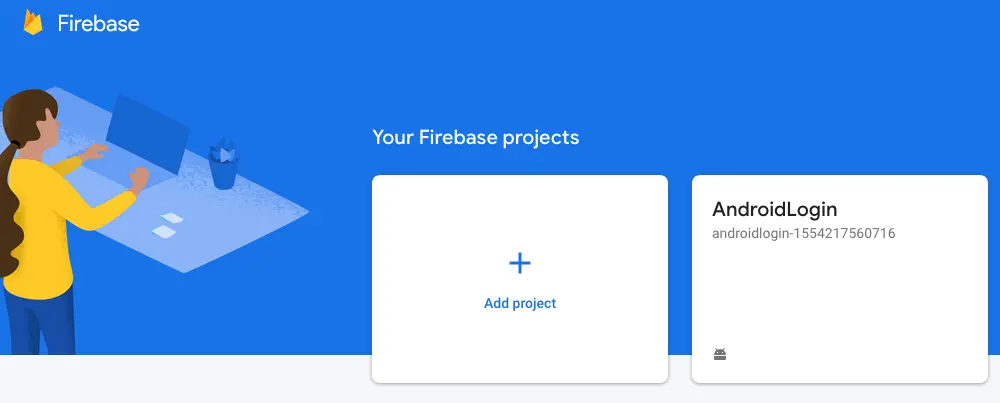
Login to the console and you can find the below screen where you can create a project
After selecting the project then you can go to the project console where you will be provide these options

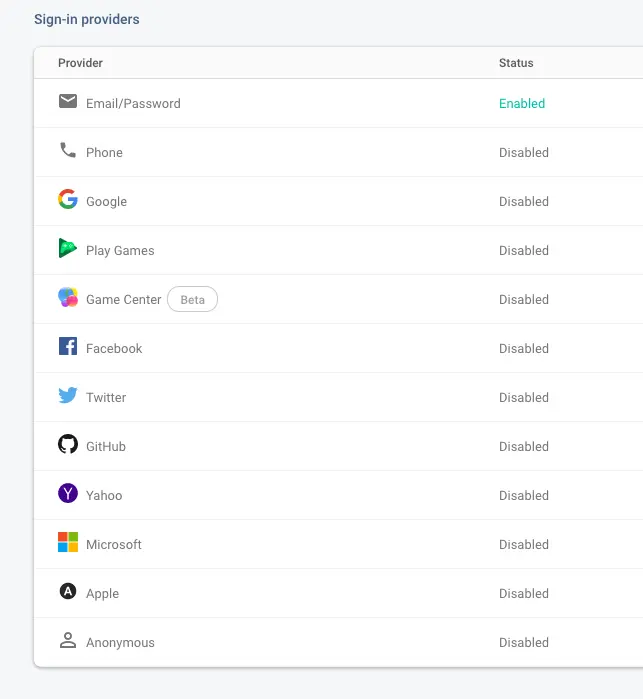
After selecting the Authentication tab we will navigate to this below page
Dependency :
build.gradle (Project: FirebaseLogin)
classpath 'com.google.gms:google-services:4.2.0'
build.gradle (Module: App)
apply plugin: 'com.google.gms.google-services'
implementation 'com.google.firebase:firebase-auth-ktx:19.3.1'
Firebase login Video Tutorial :
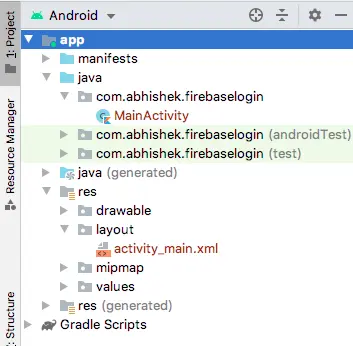
Project Structure :
This image depicts the project structure for firebase login implementation.
AndroidManifest.xml
Add internet permissions
<uses-permission android:name="android.permission.INTERNET"/>
activity_main.xml :
Add two input fields to take user input and buttons for login and registration and also forgot password field.
<?xml version="1.0" encoding="utf-8"?>
<androidx.constraintlayout.widget.ConstraintLayout xmlns:android="https://schemas.android.com/apk/res/android"
    xmlns:app="https://schemas.android.com/apk/res-auto"
    xmlns:tools="https://schemas.android.com/tools"
    android:layout_width="match_parent"
    android:layout_height="match_parent"
    android:padding="40dp"
    tools:context=".MainActivity">

    <TextView
        android:id="@+id/textView"
        android:layout_width="match_parent"
        android:layout_height="wrap_content"
        android:layout_marginTop="60dp"
        android:gravity="center"
        android:textSize="25dp"
        android:textStyle="bold"
        android:text="Firebase \n\n Login / Registration"
        app:layout_constraintEnd_toEndOf="parent"
        app:layout_constraintStart_toStartOf="parent"
        app:layout_constraintTop_toTopOf="parent" />

    <EditText
        android:id="@+id/edt_username"
        android:layout_width="match_parent"
        android:layout_height="wrap_content"
        android:layout_marginTop="84dp"
        android:hint="username"
        android:textStyle="italic"
        app:layout_constraintEnd_toEndOf="parent"
        app:layout_constraintStart_toStartOf="parent"
        app:layout_constraintTop_toBottomOf="@+id/textView" />

    <EditText
        android:id="@+id/edt_password"
        android:layout_width="match_parent"
        android:layout_height="wrap_content"
        android:layout_marginTop="8dp"
        android:hint="password.."
        android:inputType="textPassword"
        android:textStyle="italic"
        app:layout_constraintEnd_toEndOf="parent"
        app:layout_constraintStart_toStartOf="parent"
        app:layout_constraintTop_toBottomOf="@+id/edt_username" />

    <Button
        android:id="@+id/btn_login"
        android:layout_width="wrap_content"
        android:layout_height="wrap_content"
        android:layout_marginStart="28dp"
        android:layout_marginLeft="28dp"
        android:layout_marginTop="76dp"
        android:text="Login"
        app:layout_constraintStart_toStartOf="parent"
        app:layout_constraintTop_toBottomOf="@+id/edt_password" />

    <Button
        android:id="@+id/btn_register"
        android:layout_width="wrap_content"
        android:layout_height="wrap_content"
        android:layout_marginStart="220dp"
        android:layout_marginLeft="220dp"
        android:layout_marginTop="76dp"
        android:text="Register"
        app:layout_constraintStart_toStartOf="parent"
        app:layout_constraintTop_toBottomOf="@+id/edt_password" />

    <TextView
        android:id="@+id/txt_forgot"
        android:layout_width="match_parent"
        android:layout_height="wrap_content"
        android:layout_marginEnd="16dp"
        android:layout_marginRight="16dp"
        android:text="Forgot password ?"
        android:gravity="center"
        android:textStyle="italic"
        app:layout_constraintBottom_toBottomOf="parent"
        app:layout_constraintEnd_toEndOf="parent"
        app:layout_constraintTop_toBottomOf="@+id/btn_login" />

</androidx.constraintlayout.widget.ConstraintLayout>
MainActivity.java
Initialize a FirebaseAuth reference object
private lateinit var auth: FirebaseAuth
and later initialize
auth = Firebase.auth
in onStart() method we can know the user details
public override fun onStart() {
    super.onStart()

    val currentUser = auth.currentUser
    Log.d("Status", " Login " + currentUser)
}
login functionality
Add a listener to know the success and failure of task, can get user details from success listener.
fun login() {

    auth.signInWithEmailAndPassword(
        edt_username.text.toString().trim(),
        edt_password.text.toString().trim()
    )
        .addOnCompleteListener(this) { task ->
            if (task.isSuccessful) {
                // Sign in success, update UI with the signed-in user's information
                Log.d("Status", "signInWithEmail:success")
                val user = auth.currentUser

                showAlert("User Logged-in Successfully ","Welcome :"+user)

            } else {
                // If sign in fails, display a message to the user.
                Log.w("Status", "signInWithEmail:failure", task.exception)
                showAlert("User not found ","Register")

            }

        }
}
register functionality
Add a listener to know the success and failure of task.
fun register() {

    auth.createUserWithEmailAndPassword(
        edt_username.text.toString().trim(),
        edt_password.text.toString().trim()
    )
        .addOnCompleteListener(this) { task ->
            if (task.isSuccessful) {
                // Sign in success, update UI with the signed-in user's information
                Log.d("Status", "signInWithEmail:success")
                val user = auth.currentUser

                showAlert("User Registered Successfully ","Registered :"+user)

            } else {
                // If sign in fails, display a message to the user.
                Log.w("Status", "signInWithEmail:failure", task.exception)

                showAlert("Authentication failed  ","Retry")

            }

        }
}
After registering the user

password reset
fun passWordReset() {

    if (edt_username.text.toString().trim().length > 0) {

        auth.sendPasswordResetEmail(edt_username.text.toString().trim())
            .addOnCompleteListener(this) { task ->
                if (task.isSuccessful) {
                    // Sign in success, update UI with the signed-in user's information
                    Log.d("Status", "signInWithEmail:success")
                    val user = auth.currentUser

                } else {
                    // If sign in fails, display a message to the user.
                    Log.w("Status", "signInWithEmail:failure", task.exception)
                    Toast.makeText(
                        baseContext, "Authentication failed.",
                        Toast.LENGTH_SHORT
                    ).show()

                }

            }
    } else {
        Toast.makeText(
            baseContext, "enter a user email to continue",
            Toast.LENGTH_SHORT
        ).show()
    }
}
import android.app.AlertDialog
import android.content.DialogInterface
import android.os.Bundle
import android.util.Log
import android.view.View
import android.widget.Toast
import androidx.appcompat.app.AppCompatActivity
import com.google.firebase.auth.FirebaseAuth
import com.google.firebase.auth.ktx.auth
import com.google.firebase.ktx.Firebase
import kotlinx.android.synthetic.main.activity_main.*


class MainActivity : AppCompatActivity(), View.OnClickListener {

    private lateinit var auth: FirebaseAuth

    override fun onCreate(savedInstanceState: Bundle?) {
        super.onCreate(savedInstanceState)
        setContentView(R.layout.activity_main)

        auth = Firebase.auth

        btn_login.setOnClickListener(this)
        btn_register.setOnClickListener(this)
        txt_forgot.setOnClickListener(this)

    }

    public override fun onStart() {
        super.onStart()

        val currentUser = auth.currentUser
        Log.d("Status", " Login " + currentUser)

    }

    override fun onClick(v: View?) {
        when (v!!.id) {
            R.id.btn_login -> {
                login()
            }
            R.id.btn_register -> {
                register()
            }
            R.id.txt_forgot -> {
                passWordReset()
            }
        }
    }

    fun login() {

        auth.signInWithEmailAndPassword(
            edt_username.text.toString().trim(),
            edt_password.text.toString().trim()
        )
            .addOnCompleteListener(this) { task ->
                if (task.isSuccessful) {
                    // Sign in success, update UI with the signed-in user's information
                    Log.d("Status", "signInWithEmail:success")
                    val user = auth.currentUser

                    showAlert("User Logged-in Successfully ","Welcome :"+user)

                } else {
                    // If sign in fails, display a message to the user.
                    Log.w("Status", "signInWithEmail:failure", task.exception)
                    showAlert("User not found ","Register")

                }

            }
    }

    fun register() {

        auth.createUserWithEmailAndPassword(
            edt_username.text.toString().trim(),
            edt_password.text.toString().trim()
        )
            .addOnCompleteListener(this) { task ->
                if (task.isSuccessful) {
                    // Sign in success, update UI with the signed-in user's information
                    Log.d("Status", "signInWithEmail:success")
                    val user = auth.currentUser

                    showAlert("User Registered Successfully ","Registered :"+user)

                } else {
                    // If sign in fails, display a message to the user.
                    Log.w("Status", "signInWithEmail:failure", task.exception)

                    showAlert("Authentication failed  ","Retry")

                }

            }
    }

    fun passWordReset() {

        if (edt_username.text.toString().trim().length > 0) {

            auth.sendPasswordResetEmail(edt_username.text.toString().trim())
                .addOnCompleteListener(this) { task ->
                    if (task.isSuccessful) {
                        // Sign in success, update UI with the signed-in user's information
                        Log.d("Status", "signInWithEmail:success")
                        val user = auth.currentUser

                    } else {
                        // If sign in fails, display a message to the user.
                        Log.w("Status", "signInWithEmail:failure", task.exception)
                        Toast.makeText(
                            baseContext, "Authentication failed.",
                            Toast.LENGTH_SHORT
                        ).show()

                    }

                }
        } else {
            Toast.makeText(
                baseContext, "enter a user email to continue",
                Toast.LENGTH_SHORT
            ).show()
        }
    }

    fun showAlert(title: String, message: String) {
        AlertDialog.Builder(this)
            .setTitle(title)
            .setMessage(message)
            .setPositiveButton("Ok",
                DialogInterface.OnClickListener { dialog, which ->

                })
            .setNegativeButton(
                android.R.string.no,null)
            .setIcon(android.R.drawable.ic_dialog_alert)
            .show()
    }

}
Firebase login output :
This image depicts the usage of firebase login implementation.
